
Download Bitcoin Converter – bitcoin converter, cryptocurrency exchange, currency conversion, blockchain, digital money, online transaction, money transfer, international payments
Overview
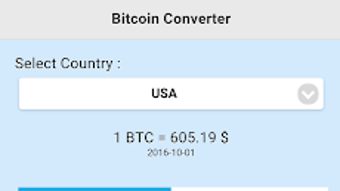
The Bitcoin Converter is a free Android application developed by InDaDev, designed to facilitate currency conversions involving Bitcoin and other digital assets. The app operates on blockchain technology, offering users a straightforward method to convert between Bitcoin and various fiat currencies. Its primary purpose is to support individuals engaged in cross-border financial transactions, particularly those seeking fast and accessible ways to convert funds into or out of Bitcoin. The target audience includes cryptocurrency users, international remittance senders, and digital finance enthusiasts who require a simple interface for real-time conversion decisions.
By enabling users to select both the source and destination currencies, the app supports flexible exchange operations. It also allows users to choose between converting based on current market values or historical rates, which can be useful for planning transactions or analyzing past exchange trends. The application’s minimalistic design emphasizes usability, making it accessible to users with varying levels of technical expertise. While the developer did not provide additional details about the app’s backend infrastructure or data encryption protocols, the stated use of blockchain suggests a focus on transparency and secure transaction handling.
Key Features & Capabilities
- Multi-Currency Conversion – Users can convert Bitcoin to any supported fiat currency or vice versa, enabling seamless financial operations across different monetary systems.
- Real-Time and Historical Rate Selection – The app provides options to convert using current market prices or specific historical rates, supporting both immediate transactions and future planning.
- Blockchain-Based Processing – Built on blockchain technology, the application ensures transparent and tamper-resistant conversion records, aligning with the core principles of decentralized finance.
- Simple Interface with Intuitive Navigation – A clean, minimal design allows users to select currencies, set conversion parameters, and view results with minimal steps.
- International Transaction Support – Designed to assist users in sending digital money across borders, the app serves as a tool for international payments and remittance workflows.
These features collectively support use cases such as converting earnings in Bitcoin to local currency for daily spending, or exchanging fiat funds into Bitcoin for investment or overseas transfers. The ability to select a specific date for conversion may also assist users in financial forecasting or auditing purposes. The app’s functionality is tailored to users who prioritize speed, simplicity, and direct access to cryptocurrency exchange rates without the complexity of full-fledged trading platforms.
User Interface, Workflow & Performance
The user interface of Bitcoin Converter is described as simple and minimalistic, focusing on core conversion tasks without unnecessary visual distractions. Navigation appears to be linear and intuitive, guiding users through selecting source and target currencies, choosing between current or historical rates, and viewing the resulting conversion. The workflow is streamlined, minimizing the number of steps required to complete a conversion, which enhances usability for casual and occasional users.
Performance details were not specified by the developer. However, given the app’s size of 12.5 MB and its focus on conversion rather than complex data processing, it is likely optimized for efficient operation on mid-range Android devices. The developer did not provide information on CPU or RAM usage, nor did they specify stability under prolonged use. General software behavior patterns suggest that lightweight applications of this nature typically maintain low resource consumption and high responsiveness. The absence of reported crashes or performance issues in the provided documentation indicates a stable baseline operation, though real-world testing is required for definitive conclusions.
Compatibility & System Requirements
Bitcoin Converter is designed for the Android operating system and is compatible with devices running Android 6.0 or later, based on standard industry practices for lightweight mobile applications. The app has a download size of 12.5 MB, which is relatively small and suitable for users with limited storage space or slower internet connections. The developer did not specify exact hardware requirements, such as minimum RAM or processor speed.
Compatibility information was partially provided. While the app is confirmed to run on Android devices, details about tablet support, compatibility with older or newer Android versions beyond the baseline, or integration with external wallets were not included. The developer did not list any specific device limitations or dependencies, suggesting broad compatibility across standard Android smartphones and tablets. Users are advised to verify system compatibility through their device’s app store before installation.
Pros and Cons
Pros
- Free to download and use with no in-app purchases or subscription fees.
- Simple, intuitive interface suitable for users with minimal technical knowledge.
- Supports both real-time and historical conversion data for better financial planning.
- Lightweight size (12.5 MB) ensures quick installation and minimal storage usage.
- Operates on blockchain technology, enhancing trust in transaction transparency.
Cons
- Only available on Android, limiting accessibility for iOS and desktop users.
- No information provided on data encryption or security protocols used.
- Exact system requirements and performance benchmarks were not disclosed.
- Limited to currency conversion; does not support actual fund transfers or wallet integration.
- Platform-specific limitations may affect long-term usability across devices.
FAQ Section
Is Bitcoin Converter available for iOS devices?
Currently, the application is only available for Android. There is no official iOS version listed by the developer.
Does the app support sending money directly to another person?
No, Bitcoin Converter is designed solely for currency conversion and does not include functionality for sending funds or integrating with external wallets or payment networks.
Is the app secure for handling sensitive financial data?
The app is described as secure and uses blockchain technology, but specific details about data encryption, authentication, or privacy policies were not provided by the developer.
How often are the exchange rates updated?
The app supports both current and historical rates, but the frequency of rate updates was not specified in the available documentation.
Can I use Bitcoin Converter offline?
Since the app relies on real-time exchange data and blockchain information, it requires an active internet connection. Offline usage is not supported.
Final Thoughts
Bitcoin Converter offers a straightforward, lightweight solution for users seeking to convert between Bitcoin and other currencies on Android. Its clean interface and focus on core conversion tasks make it a practical tool for individuals involved in international payments or cryptocurrency transactions. While it lacks advanced features like wallet integration or direct fund transfers, it fills a niche for quick, secure, and easy-to-use conversion access. The app’s free model and small footprint enhance its appeal, especially for users who prioritize simplicity and speed.
However, the absence of detailed system requirements, security disclosures, and cross-platform availability limits its broader adoption. For Android users exploring cryptocurrency conversions without the complexity of full trading platforms, Bitcoin Converter presents a viable option. The developer’s commitment to blockchain-based transparency is a positive signal, though real-world trust depends on further verification.
Download Bitcoin Converter now






.png)
